
Where Can I Make a Tiny Desk AI Video?
Find where to make a Tiny Desk AI video, what photo to upload, and how to create a cozy desk-concert take with AI Rap Video Trend.
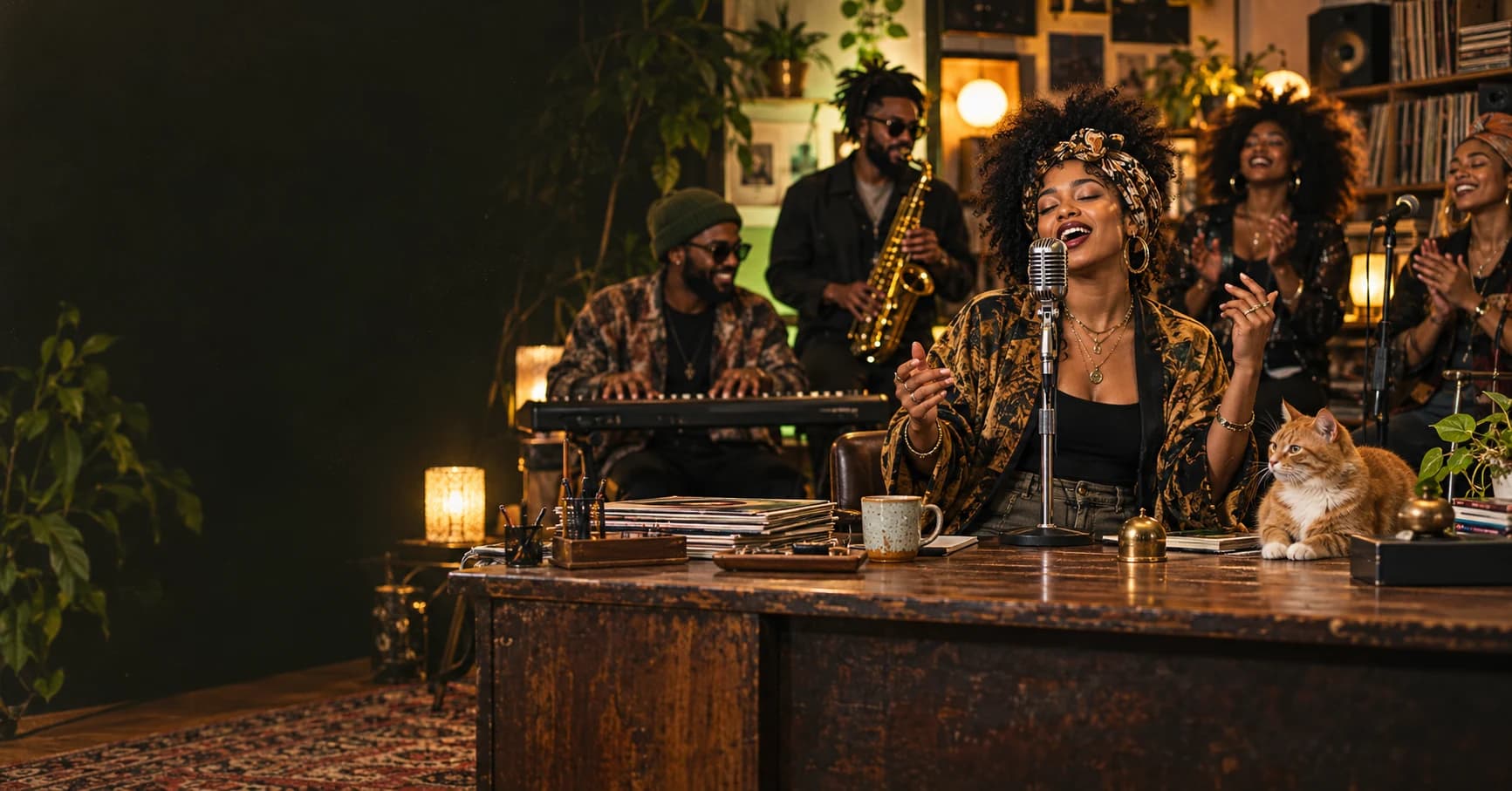
If you are looking for where to make a Tiny Desk AI video, you can create one with AI Rap Video Trend's Tiny Desk AI video generator. Upload one photo for the lead performer, choose your video settings, and generate a cozy office-concert scene with a full AI band. You do not need to write a video prompt or provide a separate photo for each musician.
Where can I make a Tiny Desk AI video online?
The most direct place is the Tiny Desk AI template page. It is built for this specific format: a lead performer at a desk-side microphone, a compact band, shelves and office details, and a performance that moves from a close-up to a sax solo and a full-band finish.
AI Rap Video Trend is a good fit if you want a photo-led Tiny Desk AI video, rather than a song file or a blank text-to-video prompt. The template supplies the scene and performance direction; your photo guides the lead. The other four adult band members are generated as part of the scene. A pet can take the lead role too, with its species and natural anatomy preserved.
The generator creates a new AI scene. It does not place your face into NPR footage or include the original “Outstanding” recording or a named artist's voice. Generated AI audio is optional.
How do I make a Tiny Desk AI video?
1. Open the Tiny Desk AI generator
Go to Tiny Desk AI and check the video example on the page. The template is already selected, so you can start with the image upload.
2. Upload one clear photo
Add one well-lit photo of the adult lead performer or pet. A clear face and uncluttered background help the generator follow the subject. The surrounding musicians are generated, so you do not need to upload pictures of the band.
Use a photo you own or have permission to animate. This template is configured for adult performers; do not upload a child's photo.
3. Choose the settings you want
Tiny Desk AI starts with 15 seconds, 720p, and vertical 9:16. You can change the available options before generating:
- Duration: 10 or 15 seconds
- Resolution: 480p or 720p
- Aspect ratio: vertical 9:16 or landscape 16:9
- AI audio: on or off
With audio on, the video gets an original upbeat funk-soul instrumental with keys, bass, handclaps, and saxophone. It has no vocal singing or lyrics. Turn audio off if you want a silent video to soundtrack yourself.
Check the credit cost shown in the generator before submitting. The settings and displayed cost are available before you create the video.
4. Generate, preview, and download
Choose Create Tiny Desk AI Video. The page opens Your result to show the task while it runs, and the saved task is available in My videos. When it finishes, preview the whole clip and check the lead's identity, the band, framing, and soundtrack before downloading.
AI results can vary. If a detail matters to your post, review the finished video before you share it.
Is a template or a general AI video generator better for Tiny Desk?
Choose the Tiny Desk AI template if you want the recognizable desk-concert setup without directing every scene yourself. A general-purpose AI video generator can be better if you want to invent a completely different office, band, or camera sequence, but you may need to describe and refine those details yourself. An AI music generator can create a track, but it does not by itself make a personalized desk-concert video.
For the specific Tiny Desk AI format, the template is the quickest starting point: upload a photo and make your Tiny Desk AI video.
What photo works best for a Tiny Desk AI video?
- Use one sharp, well-lit photo with the subject's face clearly visible.
- Choose a chest-up or waist-up image so the generated close-up has a clear identity reference.
- Avoid sunglasses, strong filters, heavy shadows, group photos, and objects covering the face.
- A pet can be the lead performer; use a photo that clearly shows its face, fur, and markings.
- Only upload photos you have permission to use.
What should I caption my Tiny Desk AI video?
Keep the caption short: start with the joke or relationship, tag the other person if relevant, and put a few related hashtags at the end.
Friends
the meeting could have been an email, but we brought a whole band 🎤 @yourfriend
#tinydeskai #officeband #bestfriends
Pets
my cat had one line and stole the whole show 🐱
#tinydeskai #petsoftiktok #aivideo
These are relevant hashtag ideas, not a promise of reach. Choose the caption that sounds like you, then use vertical 9:16 for a phone-first post on TikTok, Instagram Reels, or YouTube Shorts.
Tiny Desk AI video FAQ
Where can I make a Tiny Desk AI video for TikTok?
Use the Tiny Desk AI video generator. Choose vertical 9:16 in the settings for a phone-first format, then download and post the result to TikTok, Instagram Reels, or YouTube Shorts.
How many photos do I need?
One photo. It guides the lead performer; the other four adult band members are generated as part of the scene.
Can I use my pet's photo?
Yes. A pet can take the lead role. Use a clear photo so its face, fur, and markings are visible; the prompt asks the generator to keep the animal recognizable and use natural anatomy.
Does it use the original “Outstanding” song or NPR video?
No. The template creates a new scene and does not include the original song, concert footage, or a named artist's voice. Generated AI audio is optional and instrumental.
Do I need to write a prompt?
No. The Tiny Desk AI template supplies the scene and performance direction. You upload the lead performer's photo and choose the available settings.
Can I make the video landscape instead of vertical?
Yes. Choose 16:9 for landscape or 9:16 for vertical. The default is vertical 9:16.
Ready to make your own? Create a Tiny Desk AI video from one photo or browse more AI rap video trends.
 CONCEPT ART
Best AI Rap Video Generator
Looking for the best AI rap video generator? Compare tools by output, then use AI Rap Video Trend to make photo-led rap videos from trend templates.
Read article CONCEPT ART
How to Make a Hotel Lobby AI Rap Video
Make a viral-style Hotel Lobby AI rap video with AI Rap Video Trend. Upload two photos, pick settings, and generate an orange-booth duo take.
Read article