
How to Make an On The Radar AI Video
Learn how to make an On The Radar AI rap video from two photos. Choose the duo setup, set your video options, generate, and share your green-booth take.
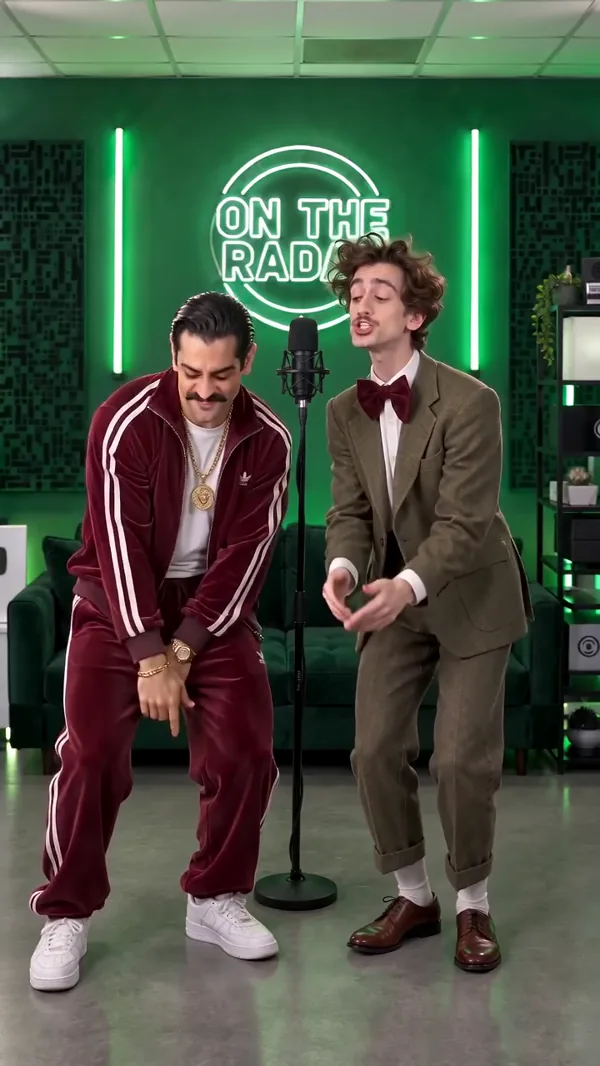
To make an On The Radar AI rap video, open the On The Radar AI video generator, upload one photo for each performer, choose your video settings, and create. Add the person you want on the left first and the person on the right second. The template builds a new green-booth rap duo scene around your photos, so you do not need to write a prompt.
What is an On The Radar AI rap video?
It is a photo-based take on the green-lit freestyle booth format: two performers, two standing microphones, headphones, and a back-and-forth rap performance. The look is associated with On The Radar Radio's freestyle clips, including a side-by-side “679” performance by Fetty Wap and Monty. AI edits later brought new people and characters into similar booth scenes.
AI Rap Video Trend's On The Radar AI template is an independent generator. It uses your two photos to guide the performers in a new video; it is not an official On The Radar, Fetty Wap, or Monty video, and it does not include the original “679” recording or an artist's voice.
How do I make an On The Radar AI video with a friend?
1. Choose two performers and prepare their photos
Pick the pair you want in the booth: friends, a partner, siblings, or even two pets. Use one separate photo per performer. A clear, well-lit portrait with the face unobstructed gives the video a stronger identity reference; avoid group photos where the generator may not know which person to follow. Only upload photos you have permission to use.
2. Upload the photos in left-to-right order
Open On The Radar AI and add the left performer first. Photo one guides the person on the left, who leads the opening verse. Add the right performer as photo two. Keeping one subject in each slot makes the duo assignment clear.
3. Choose the video settings
The template starts with a 10-second, 720p, vertical 9:16 setup. You can change the available options before generating: 10 or 15 seconds, 480p or 720p, and vertical 9:16 or landscape 16:9. You can also turn generated AI audio on or off. With audio enabled, the soundtrack follows the supplied musical reference; it is not the original “679” song.
Check the credit cost shown in the generator before you submit. The selected settings determine the format and displayed cost.
4. Generate, review, and download
Select Create On The Radar AI Video. The page switches to Your result to show the task, and you can leave while it runs because it is saved in My videos. When it is ready, preview the full clip. Check that each person stays recognizable, the left and right positions are right, and the framing and audio suit the post you want to make. Then download your video.
What should I caption my On The Radar AI video?
Keep it short: lead with the joke or relationship, tag your duo partner, and put a few relevant hashtags last. For example:
Friends
we said one take and meant one take 🎤 @yourfriend
#ontheradarai #679 #bestfriends #duo
Couples
our booth debut just dropped 🟢🎙️ @yourperson
#ontheradarai #ontheradar #couplegoals
Pets
they heard the beat and took both mics 🐾 @yourduo
#ontheradarai #petsoftiktok #duorap
These hashtags are relevant ideas, not a promise of reach. Pick a caption that sounds like you, then choose vertical 9:16 if you want a phone-first post for TikTok, Instagram Reels, or YouTube Shorts.
On The Radar AI video tips
- Put one person or pet in each photo slot.
- Add the left performer first and the right performer second.
- Use sharp, well-lit photos with faces visible and unobstructed.
- Pick 9:16 for vertical social posts, or 16:9 for landscape viewing.
- Review the generated video before sharing; AI results can vary from run to run.
On The Radar AI video FAQ
How many photos do I need?
This duo template uses two photos, one for each performer.
Which photo goes on the left?
Photo one guides the left performer. Photo two guides the right performer. Upload them in that order.
Can I use photos of pets?
Yes. Add one clear photo per subject. The template is designed to preserve each subject's appearance and adapt the performance to the subject.
Can I choose the duration and aspect ratio?
Yes. The defaults are 10 seconds and vertical 9:16, but the generator also offers 15 seconds and landscape 16:9, along with the available resolution and AI-audio options.
Does the video use the original “679” song?
No. The template creates a new AI performance. You can choose whether to include generated AI audio, but the original song and named artist voices are not included.
Will my On The Radar AI video go viral?
No generator can guarantee views. A recognizable format and a caption that fits your duo can make a post feel more personal, but its reach depends on your audience and how the platform distributes it.
Ready to make your own? Create an On The Radar AI rap video from two photos, or explore more AI rap video trends.
 CONCEPT ART
Best AI Rap Video Generator
Looking for the best AI rap video generator? Compare tools by output, then use AI Rap Video Trend to make photo-led rap videos from trend templates.
Read article CONCEPT ART
How to Make a Hotel Lobby AI Rap Video
Make a viral-style Hotel Lobby AI rap video with AI Rap Video Trend. Upload two photos, pick settings, and generate an orange-booth duo take.
Read article